
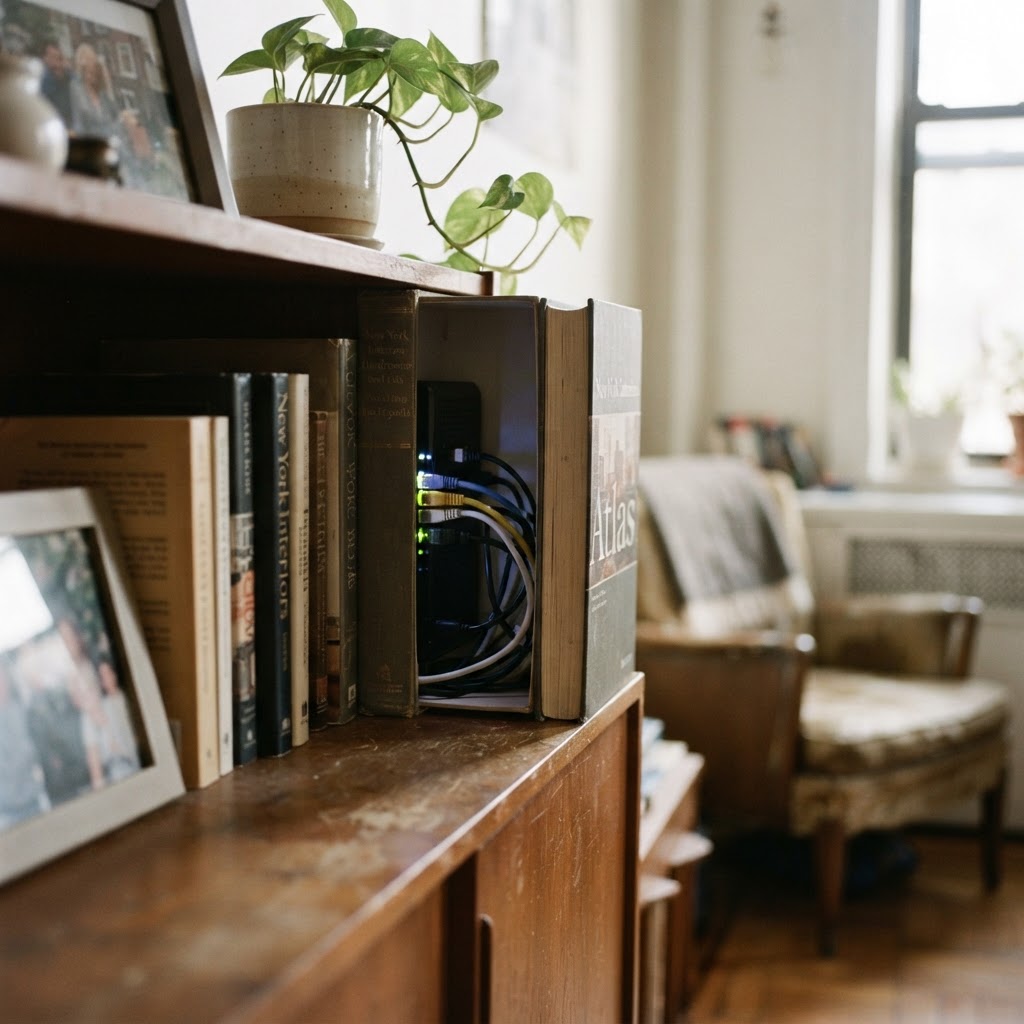
Rethinking your tech storage
If you live in a classic NYC studio or a tight one-bedroom, every square inch counts. Your internet gear is likely sitting on a shelf or the floor, acting as a magnet for dust and creating a tangled mess of cables. The good news is that you can hide your router and modem in a small apartment without sacrificing signal quality. The key is balance: you need to mask the equipment while keeping it ventilated so it does not overheat. Proper storage allows you to reclaim visual space while maintaining the high performance necessary for remote work and streaming.
Choosing the right concealment method
Before you start, check your router manufacturer guide regarding heat dissipation. Electronics need air. If you lock your device in a solid box, it will likely overheat, drop your signal, or eventually fail. Before beginning any project, measure the exact dimensions of your modem and router including the height of any protruding antennas. A good rule of thumb is to allow at least two inches of clearance on every side to ensure adequate airflow. If you are using a storage box, verify that the internal temperature does not exceed the manufacturer limit, which is typically around 95 degrees Fahrenheit.
Using ventilated baskets and boxes
The easiest way to tidy up is to find a basket made of open-weave rattan or wire. These materials allow air to flow through while keeping the black boxes out of sight. Place the basket on a bookshelf or a console table near your main internet jack. If you have an ugly spaghetti mess of ethernet and power cables, look for a cable management box. These are designed to house the power strip and the modem, keeping everything contained.
When organizing your cables, use a logical sequence. Start by unplugging all cables and labeling them with masking tape. Thread the main power line and internet line through the rear openings of your box first. Connect them to a surge protector located inside the box. Then, connect your power bricks and ethernet cables. If the setup is too complex or involves drilling into your apartment walls, you should book a handyman to handle the precise routing. Using labels prevents the common mistake of unplugging the wrong device during future troubleshooting sessions.
Mounting gear off the floor
In tiny New York apartments, floor space is gold. Many routers come with mounting holes on the back. You can mount yours to the wall behind a large piece of artwork or on the side of a media console. Use a stud finder before you begin to ensure you are drilling into solid wood rather than just hollow drywall, which is common in older NYC buildings. If you are not confident about placing hardware on your walls, especially in a rented co-op or condo where you want to minimize damage, book a TV mounting specialist who understands how to safely manage tech hardware and cables without ruining your walls. Never mount a router inside a metal cabinet, as metal blocks Wi-Fi signals.
NYC apartment building rules and wiring
When modifying your home network in New York, you must respect building regulations. Most co-ops and condos have strict rules regarding the installation of permanent fixtures on shared walls or in common areas. Avoid running new coaxial or ethernet cables through hallways or across doorway thresholds, as this can create a tripping hazard and violate lease agreements. If you need to run cables along baseboards, use adhesive clips rather than nails or staples to prevent damaging the historic plaster or molding found in many older Manhattan apartments.
Always check if your building has an exclusive agreement with a specific internet provider. In many cases, the modem must stay in the location where the service line enters the apartment. If the signal is weak, do not try to move the jack yourself. Drilling through fire-rated walls or into building risers is prohibited in almost all NYC high-rises. Instead, use a mesh Wi-Fi system to extend your signal reach throughout the apartment without modifying the infrastructure.
Maintaining your network and storage system
Once your gear is organized, you must establish a maintenance routine. Dust is the silent killer of tech gear. Every three months, use a can of compressed air to blow debris out of the router cooling vents and the weave of your storage basket. If you notice your internet speed dropping, check for loose connections. Vibration from nearby traffic or subways can sometimes loosen ethernet cables over time.
Periodically inspect the adhesive on your cable clips. High humidity in NYC summers can cause glues to fail, leading to messy cord drooping. Keep a small kit containing velcro ties, extra clips, and a few cable labels inside your media console. If you ever upgrade your router to a newer, larger model, check the dimensions against your current storage box before purchasing. Proactive maintenance ensures your home network remains both aesthetically pleasing and technically reliable.
When to call in the professionals
Sometimes, the issue is not just hiding the modem, but relocating it to a better spot in the apartment. If your router is currently stuck in the entryway but your home office is in the bedroom, you are likely dealing with poor connection speeds. Moving the cable jack requires specialized tools and knowledge of how to fish wires through older wall cavities.
If you find yourself struggling to install wall-mounted storage or need assistance setting up a more robust mesh network, it is time to get help. You can easily book tech setup for a professional to configure your network correctly. If you have purchased a new desk or a dedicated storage unit that requires complicated assembly, book furniture assembly to ensure it is sturdy and installed safely. Remember, if a project involves drilling into plaster walls or requires specialized tools you do not own, you should book a handyman to avoid damaging your rental.
Frequently Asked Questions
Can I hide my router inside a closed wooden cabinet?
It is not recommended. Solid wood blocks Wi-Fi signals and traps heat, which will cause your router to run slowly or potentially overheat and fail.
Does hiding the router reduce my internet speed?
If you place the device behind thick walls or dense metal objects, yes. Try to keep your router in an open, breathable space that is central to your living area.
How can I manage the messy cables near my modem?
Use velcro ties instead of plastic zip ties to bundle cables together. This makes it easier to adjust or replace wires later without needing to cut anything.
Book help in New York
If you need help setting up your home network or mounting storage solutions in your NYC apartment, our team is ready to assist. You can book a handyman to help get your tech organized today.